 garlicoin.org
Got a Garlicoin gift card?
Someone gave you some garlic bread money. Here's how to move it into a wallet of your own, step by step. It takes about 15 minutes of your time, plus a while for the wallet to download the blockchain.
First, see what's on it
Type or paste the address from the front of the card (not the private key from the inside). You'll see its balance on the block explorer.
Move the coins into your wallet
- Install Garlicoin Core from the official downloads page ↗ and start it. It's the Garlicoin wallet for Windows, macOS and Linux.
- Let it sync. The first time, it downloads the whole blockchain. That can take many hours; our bootstrap file makes it much faster. You can carry on with the next steps while it syncs, but the coins only show up once it's done. Check how far along it is.
-
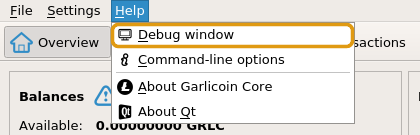
Open the console: Help → Debug window, then the Console tab. (Or press Ctrl+Shift+C.)
-
Import the key. Type
importprivkey, a space, then the private key from inside the card, and press Enter. Copy it carefully: capitals matter. If it answersnull, it worked.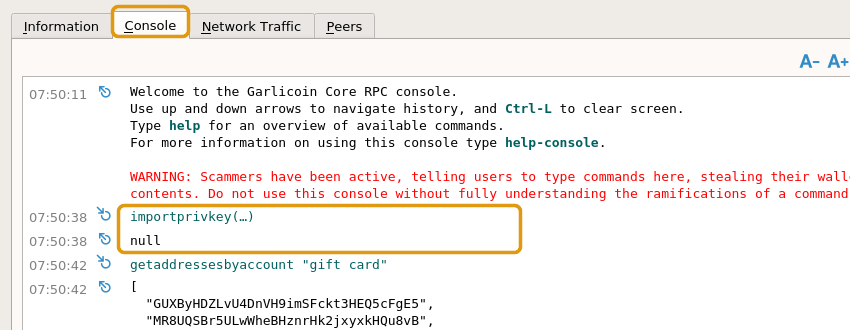
The wallet now re-reads the whole blockchain looking for the card's coins. It can take half an hour or more and the window may look frozen. Leave it be. The one key covers the card's address whether it starts with G or grlc1.
-
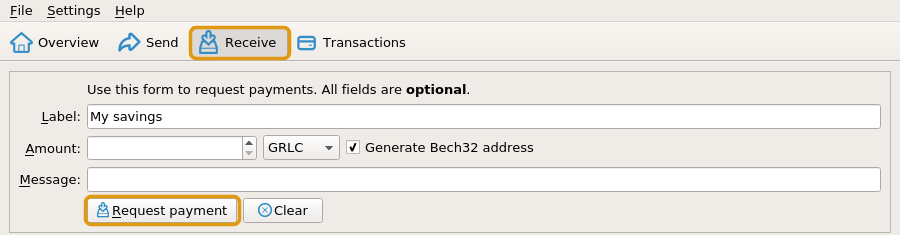
Make an address of your own: open Receive, type a label like "My savings" and press Request payment. Copy the new address.
-
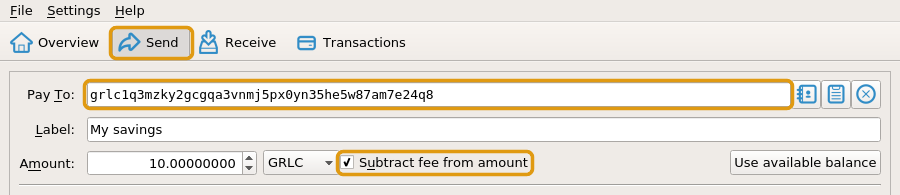
Send the coins to it: open Send, paste your new address into Pay To, press Use available balance, tick Subtract fee from amount, then press Send.

- Done. The coins are now yours alone. Throw the card away or keep it as a souvenir: it's empty.
Why move the coins?
Whoever printed the card saw its private key, and anyone who finds the card can use it too. Until you send the coins to an address only your wallet knows, they're only as safe as the piece of paper. After step 6, they're as safe as your wallet.
Stay safe
- The console warns about scammers. That's right: only type the command above, with your own card's key.
- Never send the private key to anyone, including people offering to help. Nobody needs it but you.
- Encrypt your wallet (Settings → Encrypt Wallet) and back it up (File → Backup Wallet).
No computer?
Right now Garlicoin Core is the only wallet that can claim a card. Garlium, the light wallet listed on garlicoin.io, can't connect: all of its servers are offline (checked October 2026). Keep the card safe until you can use a computer, or ask in the Discord.
Want to give one?
Make your own on the gift card page.