 garlicoin.org
Got a gift card?
Move the coins from a gift card, gift link or paper wallet to your own address. The card's key never leaves this page.
Someone sent you Garlicoin!
The link holds the coins. Enter your address or garlic name and press Claim it. No wallet yet? Keep the link: the coins stay safe until you claim them.
Claim it in your browser
No address yet? Add it to the Garlicoin Wallet beta
Make a wallet, tap Add a gift and type the card's key (or paste the gift link). The coins arrive in a minute.
How this stays safe
- Everything goes to your address, minus a fee under a cent. Then the card is empty.
- Why move the coins? Whoever printed the card saw its key. Until the coins are at your address, they're only as safe as the paper.
Just want to see what's on it?
Paste the address from the front of the card (not the private key) to see its balance.
Do it in Garlicoin Core instead
- Install Garlicoin Core from the official downloads page ↗ and start it. It runs on Windows, macOS and Linux.
- Let it sync. The first blockchain download can take hours; our bootstrap file speeds it up. You can do the next steps meanwhile, but the coins show up only once it's done. Check how far along it is.
-
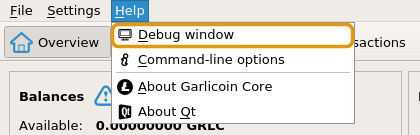
Open the console: Help → Debug window, then the Console tab (or Ctrl+Shift+C).
-
Import the key. Type
importprivkey, a space and the card's private key, then press Enter. Capitals matter. If it answersnull, it worked.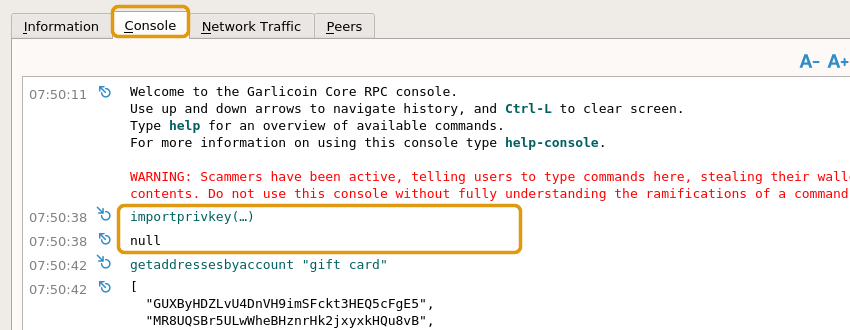
The wallet now rescans the blockchain for the card's coins. This can take half an hour or more, and the window may look frozen: leave it be. The key covers the card's address whether it starts with G or grlc1.
-
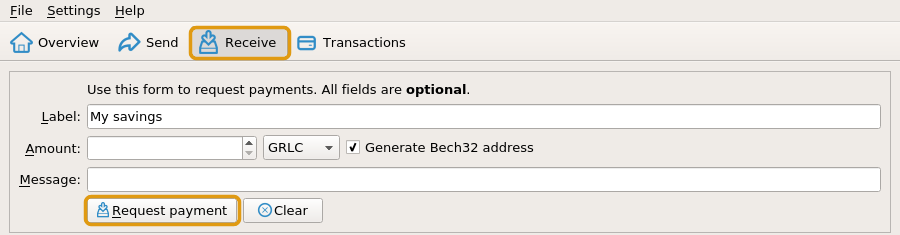
Make an address of your own: open Receive, type a label like "My savings" and press Request payment. Copy the new address.
-
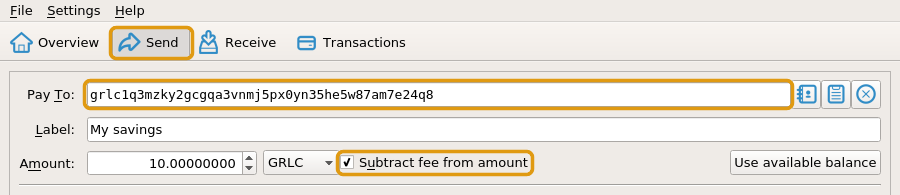
Send the coins to it: open Send, paste your new address into Pay To, press Use available balance, tick Subtract fee from amount, then press Send.

- Done. The coins are yours alone. The card is empty: toss it or keep it as a souvenir.
Stay safe
- The console warns about scammers. Rightly so: type only the command above, with your own card's key.
- Never send the private key to anyone, even people offering help. Nobody needs it but you.
- Encrypt your wallet (Settings → Encrypt Wallet) and back it up (File → Backup Wallet).
Other wallets
On a computer, Garlium ↗ is lighter than Garlicoin Core: no blockchain download. Its server list is out of date, so open Tools → Network, turn off automatic server selection and enter electrum.maxpuig.com:50002 or electrum.niftybakes.com:50002 (community servers, working in October 2026). Then claim the card with Wallet → Private keys → Sweep.
Any wallet that can sweep or import a Garlicoin private key works too. Stuck? Keep the card safe and ask in the Discord.
Want to give one? Make a gift card or send a gift link.
Free and provided as is: you're responsible for keeping keys and backups safe, and transactions can't be undone. See the terms of use.